For home watch & estate management companies across the US

Home watch and estate
management software,
under your brand.

GPS-verified visits, offline mobile inspections and storm-ready reports, all carrying your company’s name and logo.

  • Client & vendor portals
  • Custom checklists
  • Fail alerts to your office

Free 7-day demo workspace. No credit card required.

Ready for your real workspace? Start a 30-day free trial on any plan.

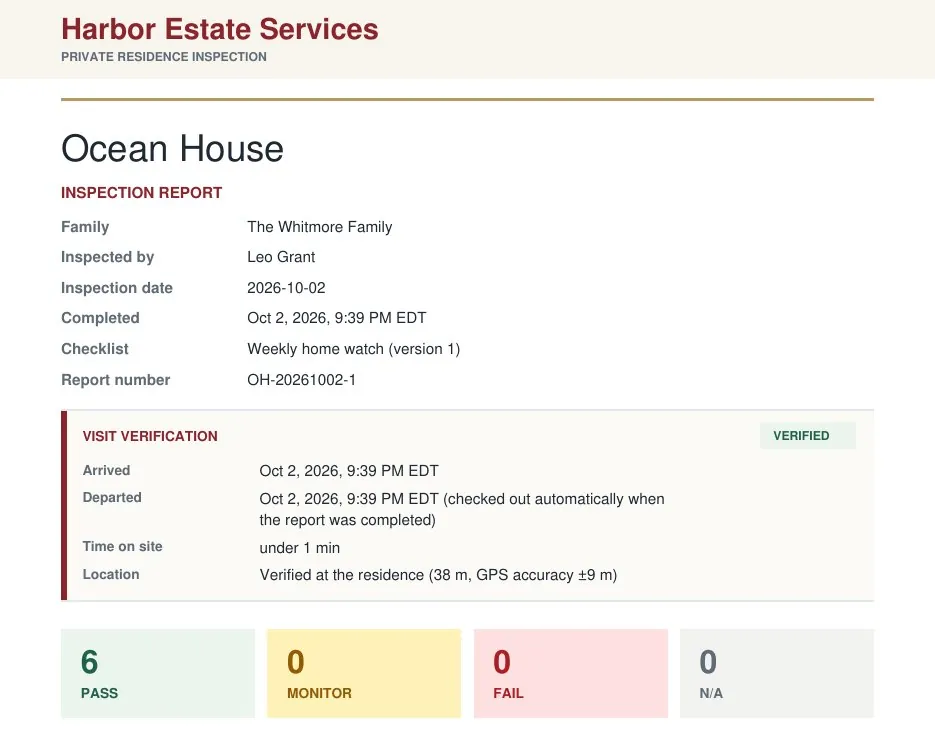
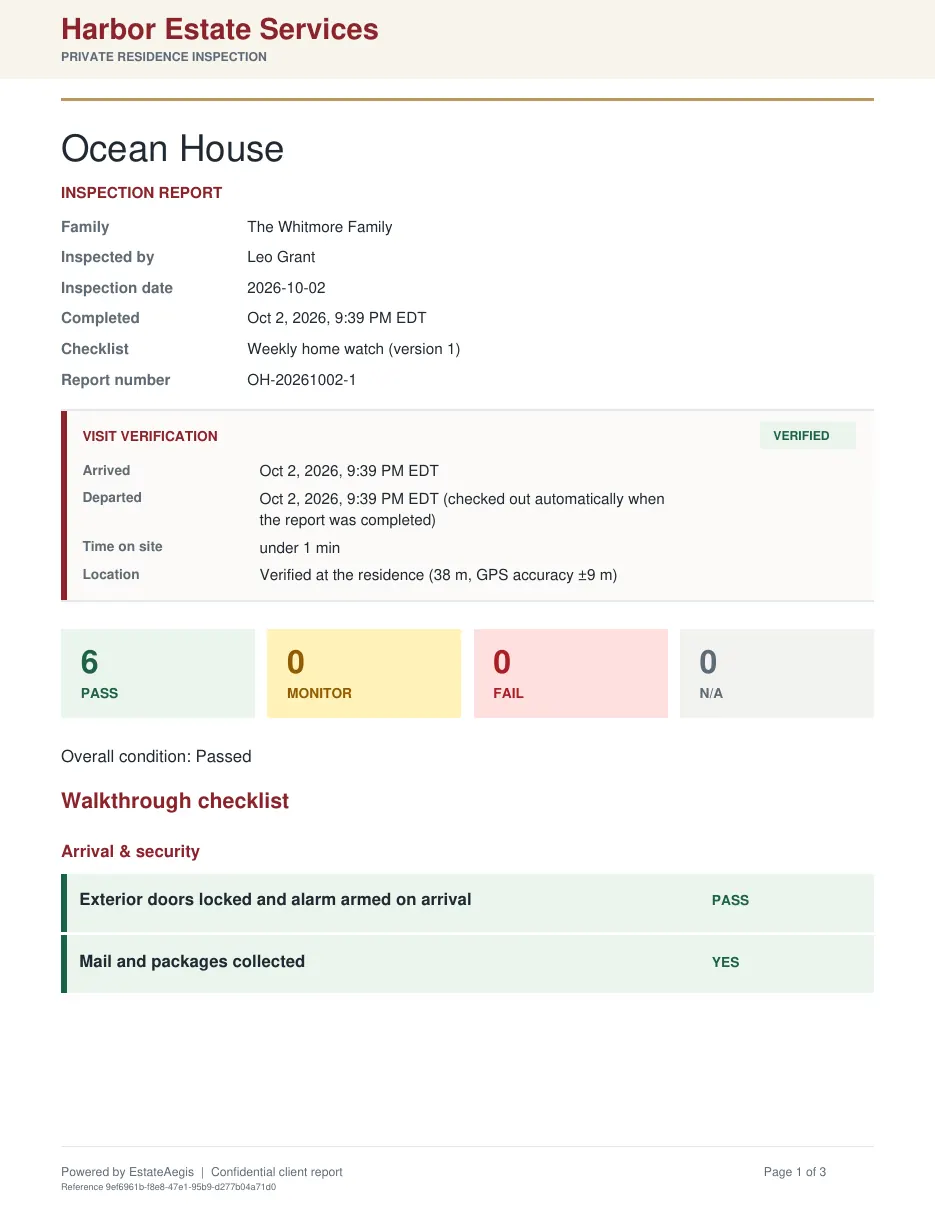
Company-branded inspection PDF for Ocean House with a Visit verification box: arrived, departed, time on site, and location verified at the residence (38 m, GPS accuracy ±9 m)
Demo workspace · sample data
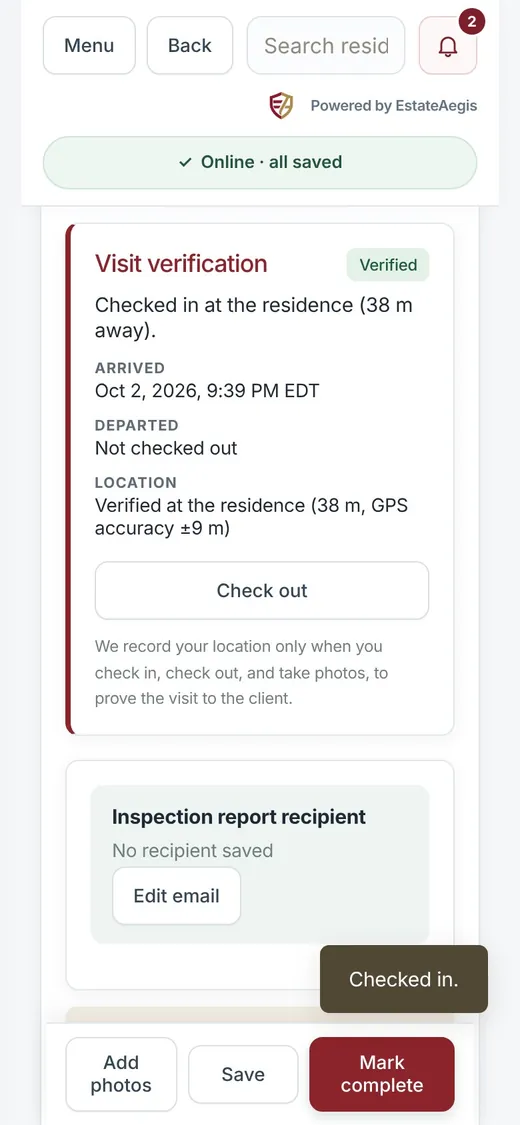
Inspection on a phone: Visit verification card showing Verified, checked in at the residence 38 m away
Checked in · 38 m from the residence Visit verification prints on the report
GPS-verified visitsWorks offline in the fieldStorm & severe weather workflowCompany-branded reportsClient & vendor portals

What’s new in EstateAegis

Built for the way home watch actually works.

Five new tools for the field and the office, from the first walkthrough to the week after a storm.

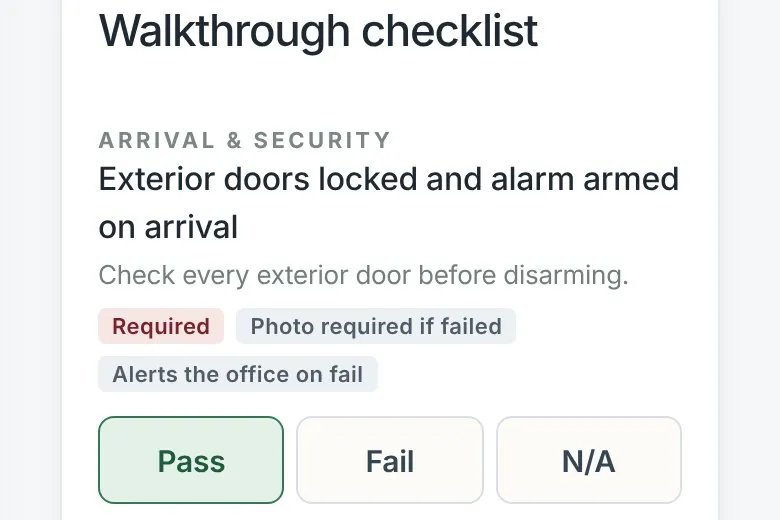
Checklist item on a phone marked Required, Photo required if failed, and Alerts the office on fail, with Pass, Fail and N/A buttons
NEW01 / Checklists

Custom checklist templates.

Build your own visit checklists, or start from ready-made templates and adjust them to each home.

  • Starters for routine, arrival, departure, seasonal, maintenance, pre-storm (hurricane prep) and post-storm visits
  • Mark items required, ask for a photo on fail, and choose which items alert the office
  • Field staff only see a checklist once you publish it
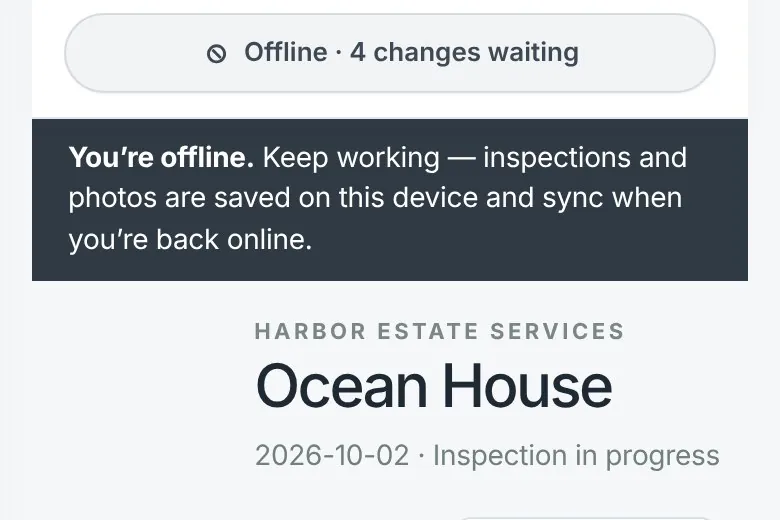
Phone inspection screen showing Offline · 4 changes waiting and a banner: inspections and photos are saved on this device and sync when you’re back online
NEW02 / Mobile

Offline mobile inspections.

No signal at the gate or in the garage? Keep working. The inspection carries on and catches up later.

  • Checklists, notes and photos save on the phone
  • Everything syncs when you’re back online
  • A sync panel shows exactly what’s still waiting
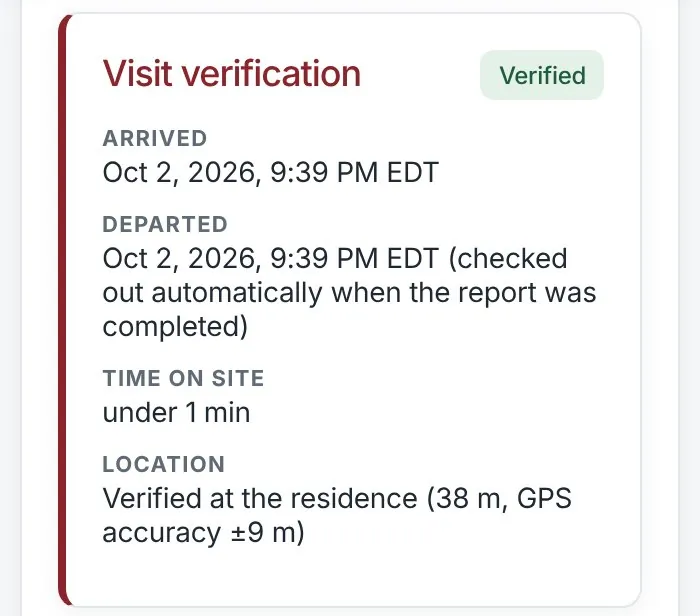
Client portal on a phone: Visit verification box marked Verified with arrival, departure, time on site, and location verified at the residence
NEW03 / Proof of visit

GPS proof of every visit.

Check in on arrival and the visit is verified at the residence, with the distance and GPS accuracy recorded.

  • Arrival, departure and time on site on every report
  • The same Visit verification box in the client portal
  • Location is recorded only at check-in, check-out and when photos are taken
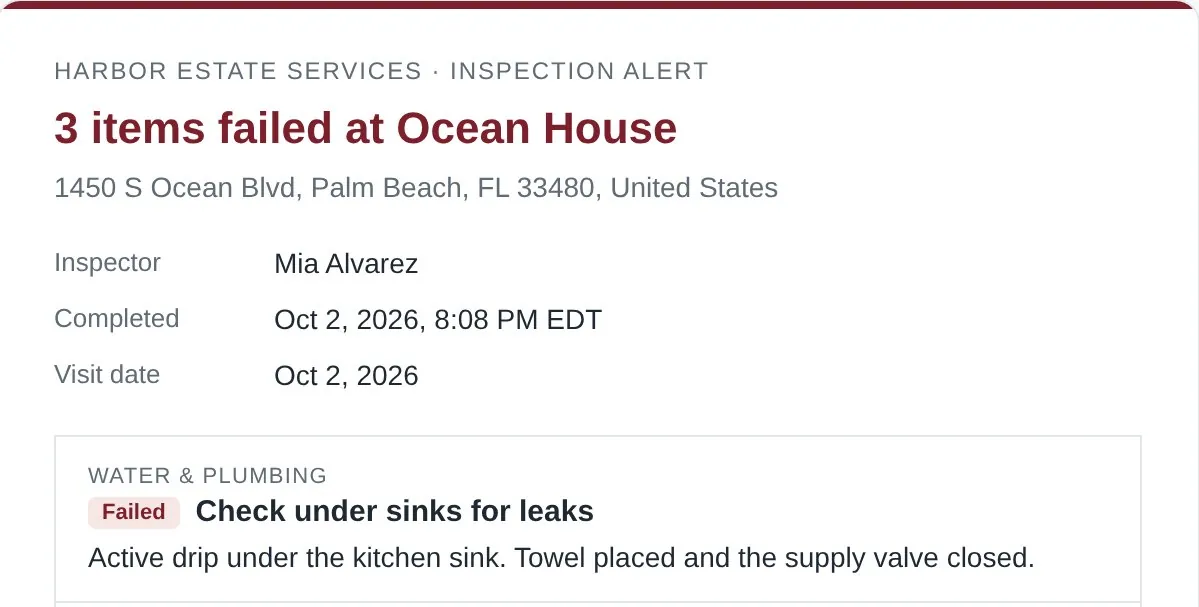
Inspection alert email: 3 items failed at Ocean House, listing the failed item and the inspector’s note
NEW04 / Fail alerts

Fail alerts when something’s wrong.

When an inspection comes back with failed items, your administrators and the home’s residence manager get an email and an in-app alert.

  • Each alert lists the failed items and the inspector’s notes
  • One tap opens the inspection
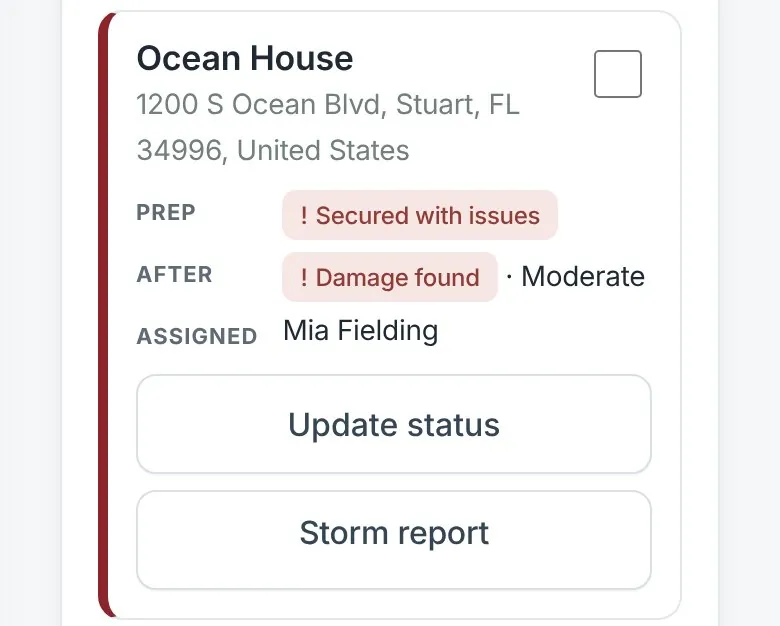
Storm board card for Ocean House: prep secured with issues, damage found (moderate), with Update status and Storm report buttons
NEW05 / Storms

Storm & severe weather workflow.

A hurricane, a winter storm, a flood or a severe thunderstorm: run it from the first warning to the last post-storm check, and send each family an insurance-ready storm report.

  • Pre-storm and post-storm visits for every home, in bulk
  • Prep and damage status for each residence on one board

Screens from demonstration workspaces with sample data.

Storm season, handled

When severe weather is coming, every home is accounted for.

Hurricanes, winter storms, floods and severe thunderstorms: plan the prep, watch it get done, and document what you found after, without a spreadsheet or a group text.

Ready before the forecast turnsPre-storm (hurricane prep) and post-storm checklists are included as starter templates. Adapt them to the weather you face, from freeze prep to flood checks.
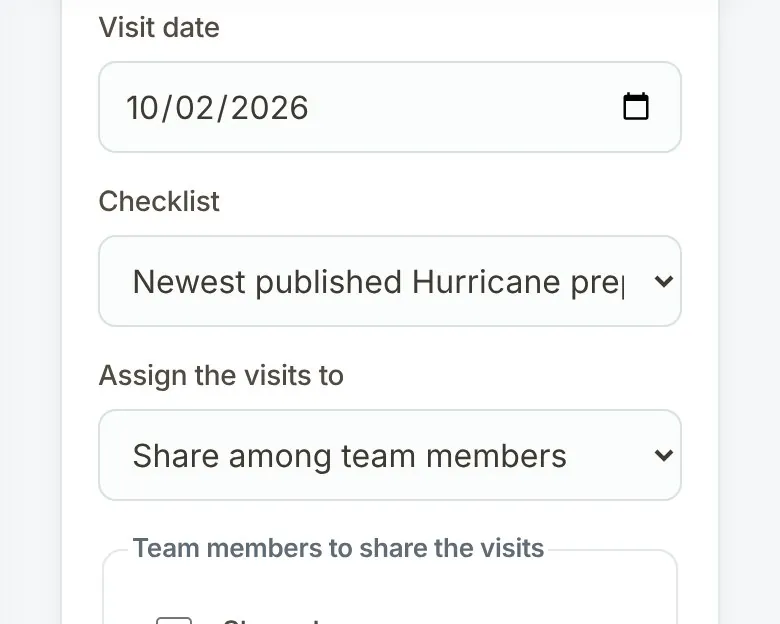
  1. Scheduling pre-storm visits on a phone: visit date, the newest published hurricane prep checklist, and visits shared among team members3 visits created using Hurricane prep (version 1).
    1

    Bulk storm visits.

    Pick the residences, choose your pre-storm checklist and share the visits across your team. One step schedules every home.

    • Pre-storm and post-storm visits
    • Only homes without a visit get a new one
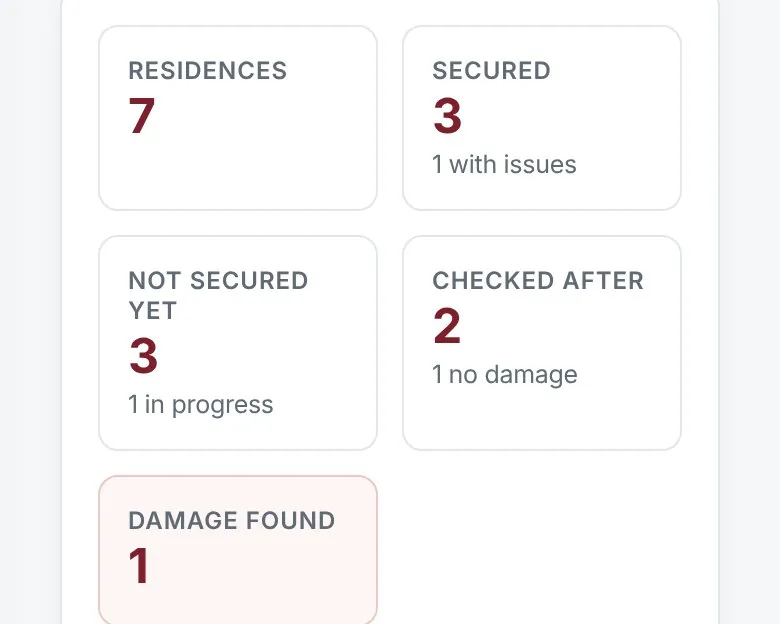
  2. Live storm board on a phone: 7 residences, 3 secured, 3 not secured yet, 2 checked after, 1 with damage found
    2

    Live status board.

    See which homes are secured, which aren’t yet, which have been checked after and where damage was found.

    • Updates on its own every 30 seconds
    • Message families, export a CSV or a summary PDF
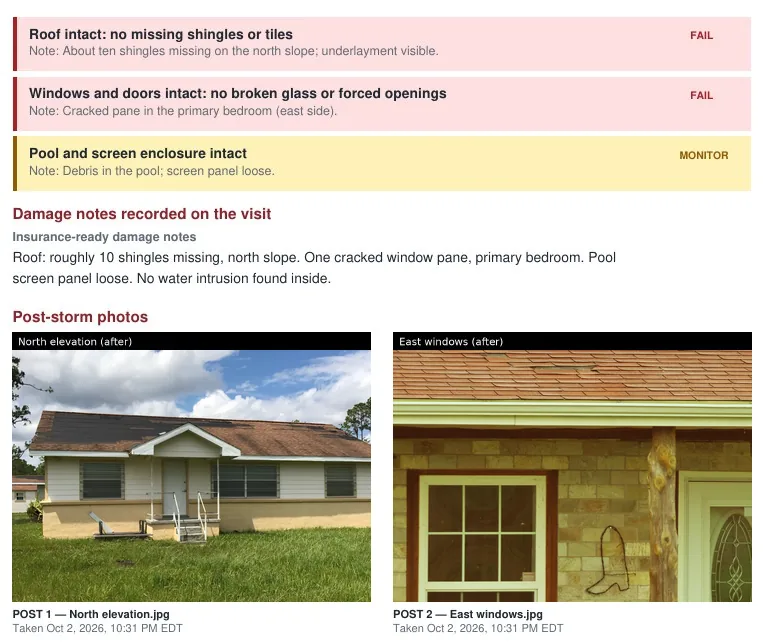
  3. Storm report page with failed roof and window items, insurance-ready damage notes, and timestamped post-storm photos of a roof with missing shingles and the east windows
    3

    Insurance-ready storm report.

    Each family gets one branded report: before and after photos, GPS-verified visits, a timeline and damage notes ready to share with their insurer.

    • Timestamped photos from both visits
    • Damage severity and inspector notes

Storm reports document what your team observed on scheduled visits. They aren’t an insurance adjuster’s assessment or a guarantee of condition.

Try the storm workflow in your demo

Everything in one workspace

Less searching.
More time caring for residences.

Keep the people, plans, and property records connected, from the first family profile to the next scheduled visit.

01 / RESIDENCES

Know the home and the household.

Connect families to their residences. Record rooms, preferences, and the residence manager, then manage family invitations and linked access.

02 / INSPECTIONS

Make every walkthrough count.

Capture findings, notes, and photos. Flag items to monitor or fix, then create linked work orders for follow-up.

03 / SERVICE WORK

Keep the next step clear.

Assign work, set due dates, add progress notes, request information, and record client approvals. Keep updates with the job.

04 / ARRIVALS

Welcome clients to a prepared home.

Bring room readiness, preferred shopping, guests, and special instructions together for each arrival.

05 / YOUR TEAM

Give everyone the right context.

Coordinate staff schedules, daily routes, and vendor assignments. Relevant email notifications point people back to the details in the system.

06 / COMMUNICATION

Keep the conversation connected.

Send direct or company-wide messages. Clients and vendors use their own portals, with access matched to their accounts.

Example company-branded inspection PDF for Ocean House with inspector details, a Visit verification box and pass, monitor and fail totalsExample inspection report · demonstration data

Your brand, clearly presented

Reports you’ll be proud to send.

Give your clients a clear, professional view of the care their residence receives.

  • Your company name and logo lead the report.
  • Inspector, completion time, findings, and photos stay together.
  • A Visit verification box shows arrival, departure and GPS distance.
  • Client notes are separate from internal notes.
  • Published reports use the residence’s saved email recipient.
Download the feature overview PDF

Built for trust

Your clients trust you with their homes. We take that seriously.

The safeguards are part of everyday use, not an add-on.

Two-factor sign-in.

Each person can protect their own account with an authenticator app and saved recovery codes.

Separate client, vendor and admin portals.

Clients, vendors and your team each sign in to their own portal and see only what their role allows.

Audited access codes.

Gate, door, alarm and lockbox codes are limited to administrators and the assigned residence manager. Every view and change is recorded.

Company-branded reports.

Your company name and logo lead every report. EstateAegis appears only as “Powered by EstateAegis” in the footer.

Talk to a real person.

Questions about your workspace? Call us directly at 772-237-1382 or email help@estateaegis.com.

See the actual workflow

Take a guided tour.

A six-minute tour of a typical week, from the first visit of the day to storm prep. 12 chapters to help you find what you need.

Prefer a quick overview? Download the PDF ↓
Download video

Recorded in a demonstration workspace. Your available screens depend on your account’s role.

Simple monthly pricing

A plan for the homes you care for.

Every paid plan starts with a 30-day free trial for new companies. Check out securely through Stripe and receive your company invitation automatically. Billing begins after the trial unless cancelled.

Launch pricing · save $20/month
7days

Free demo workspace

Explore a private demo with sample records. No credit card and no automatic subscription. Demo records are temporary.

Start your free 7-day demo

30days

Free trial of your real workspace

Choose a plan below and check out securely through Stripe. Billing begins after 30 days unless you cancel.

Cancel future renewals from your account.

Essentials

Up to 50 active residences

Regular price $79 Launch price $59 /month

30 DAYS FREE

  • 4 admin/staff users
  • Plus 8 free field inspector logins
  • 10 GB shared storage
  • Unlimited client and vendor logins
Choose Essentials

Professional

Up to 300 active residences

Regular price $199 Launch price $179 /month

30 DAYS FREE

  • 20 admin/staff users
  • Plus 40 free field inspector logins
  • 50 GB shared storage
  • Unlimited client and vendor logins
Choose Professional

A few things to know

Built for your company’s daily work.

Can we use our own company branding?

Yes. Add your company name and logo in Company settings. Your branding appears in the workspace and on inspection reports, with Powered by EstateAegis in the report footer.

What can clients and vendors see?

Clients use a focused portal for their assigned residences, reports, arrivals, service requests, messages, and approvals. Vendors work with jobs assigned to their vendor account.

Can we try it before deciding?

Yes. Start a free 7-day demo workspace: verify your email, create your account and explore sample records. No credit card required.

What’s the difference between the free demo and the 30-day trial?

The free 7-day demo is a private practice workspace with temporary sample records and a reset button. No credit card is needed, and outgoing report emails and payments are turned off. The 30-day free trial is separate: it starts when you sign up for a paid plan, it’s your company’s real workspace, and checkout is through Stripe. Billing begins after the 30 days unless you cancel. The demo and your paid workspace are separate, so demo records don’t carry over.

What does it cost, and how do we get support?

Plans start at $59/month (launch pricing) and include 4 admin/staff users and 10 GB of storage. Client and vendor logins are unlimited on every plan and don’t count toward your users. Every plan also includes free field inspector logins (8 on Essentials, 20 on Growth, 40 on Professional): visit-only access for your field team that never uses a seat. View pricing or contact Sales. Existing customers can reach software support at help@estateaegis.com.

See what a more organized day looks like

Explore EstateAegis
with your team in mind.

Create your own private demo workspace in minutes.