Make findings easy to scan
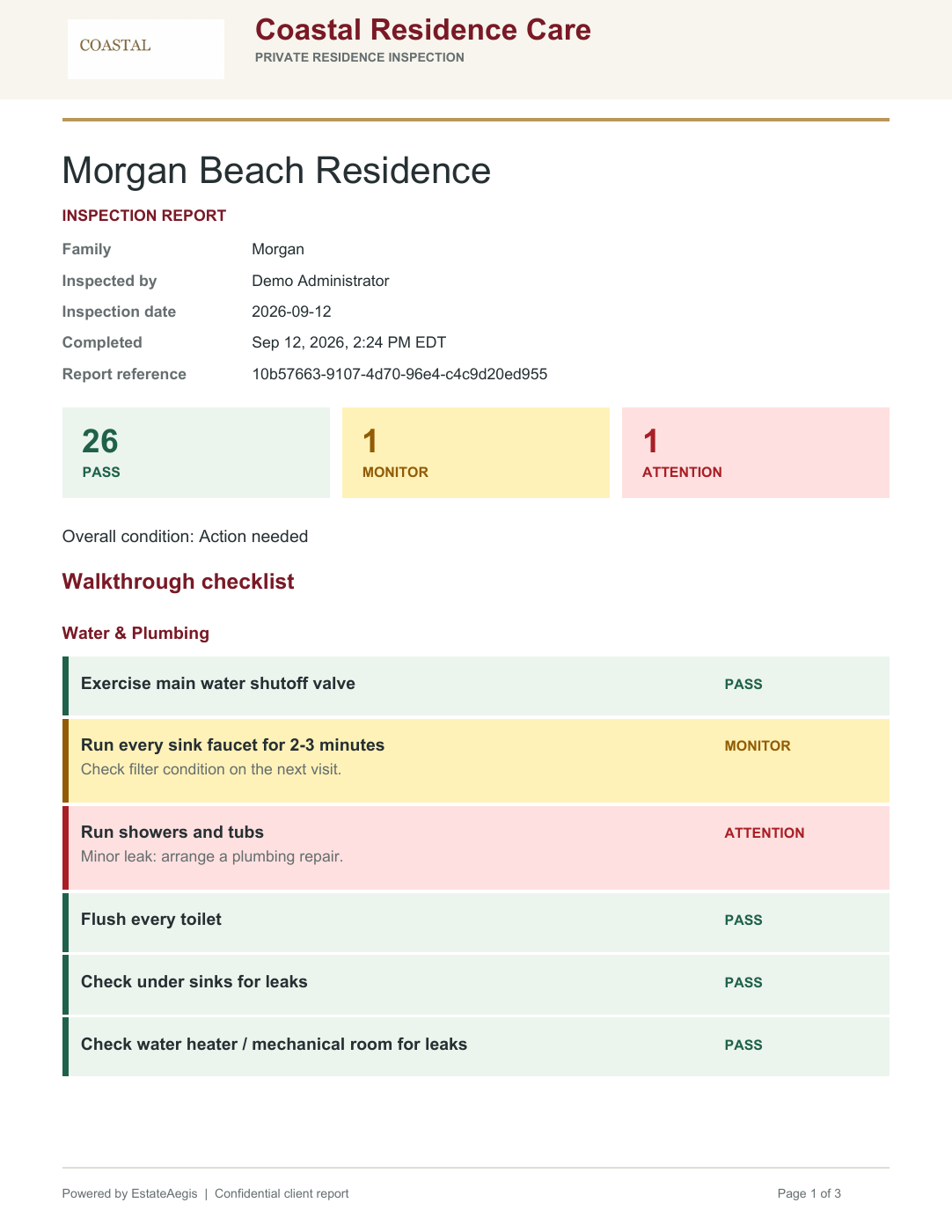
Monitor items appear in yellow and Attention items in red. Include photos to give the client context for what your inspector found.
 EstateAegis
Home Watch Inspection Report Software
Create company-branded inspection PDFs with photos, color-coded findings, and a clear record of who completed the inspection and when.
 Demonstration workspace · sample data
An inspection report should help the client understand the condition of the home and what needs attention. EstateAegis brings checklist findings, photos, and notes into a branded PDF, then connects the findings to the work your team needs to arrange.
Monitor items appear in yellow and Attention items in red. Include photos to give the client context for what your inspector found.
Your company name and logo lead the PDF. The report records the inspector and completion time, with client notes and an inspection summary.
Store the report email on the main residence inspection page. Completing and publishing starts report delivery to that saved address.
Choose the residence’s inspection frequency, next due date, and report email.
Work through the checklist and add photos, Notes to the client, and the inspection summary. Internal notes stay out of client reports.
Save a draft while work is in progress. Accidental drafts can be deleted; completing and publishing locks the report.
Create linked work from published findings and track assignments, progress notes, and client approvals.
Common questions
Yes. Completed inspection reports can be downloaded as company-branded PDFs. The tutorial demonstrates the report and its contents.
No. Save the email on the residence inspection page and use it for subsequent report delivery.
Yes. Use the Internal notes field for information that should stay out of client reports. Keep client-facing information in Notes to the client.
Start a free 7-day demo workspace with sample records. No credit card required. Plans start at $59/month, and every paid plan begins with a separate 30-day free trial.